
How I Solved a Permission Issue Using gh CLI
Fix GitHub 403 errors when running git push. Understand authentication problems, account conflicts, and how gh CLI simplifies GitHub access.


There comes a moment in every developer’s life when they’ve written their code, checked every line, and are sure the workflow is running smoothly. Then they run the command they’ve typed hundreds, if not thousands, of times before:
git push -u origin mainThough perfect — my app is now successfully pushed to GitHub. But they still got punched in the face.
A Small Error Turned Into a Bigger Problem
The error I saw looked familiar; it felt like one of those minor bugs.
remote: Permission to version_2/repo-name.git denied to version_1.
fatal: unable to access 'https://github.com/version_2/repo-name.git/': The requested URL returned error: 403
This was a permission issue. Possibly the wrong URL or a typo that could be fixed in a minute, but it stoll took some effort.
The Access Permission Mismatch
The log was telling me:
denied to version_1
But I was trying to push to a repository owned by:
version_2
What Git was doing in the background was this:
Using cached credentials from another account
Authenticating as someone else
Trying to push to an old repository
Then GitHub refused the operation.
Thinking “It Should Work”
Nothing seemed wrong:
The remote URL was correct
I had created the repository just before
The repository was accessible
Yet, the system still failed.
Trying to Fix the Layer
I started with the usual fixes. beginning by checking the remote:
git remote -vLooked fine:
origin  https://github.com/version_2/repo-name.git (fetch)
origin  https://github.com/version_2/repo-name.git (push)
Then I tried to run more commands to reset the credentials:
git config --global --unset credential.helper
git credential reject https://github.com
Nothing changed.
After that, I generated a new personal access token, thinking “maybe it’s an authentication error”. But the problem was identity selection, not authentication itself. Git wasn’t asking who I wanted to be. It had already decided.
When I Decided to Try gh
Finally found that this wasn’t about Git commands themselves. It was actually about the tooling layer around Git — the extra systems and tools that sit between you and Git/GitHub and handle credentials.
At this point, I stopped struggling with Git’s behavior and switched to a new interface:
The GitHub CLI (
gh) – is GitHub’s offical command-line interface.Git = version control system
GitHub = Git repository hosting and collaboration platform
gh = control GitHub from your terminal
Normally, you open a browser to create a new repo, then copy the URL, generate an access token, and finally push the code. With gh you can do all of this in the terminal, faster and more easily.
A New Way to Login In
There is a long-tail list of gh capabilities.
Create a repository and push it:
gh repo create repo-name --private --source=. --push2. Authenticate once, no more 403 errors, manual tokens or wrong account issues:
gh auth login

# Choose GitHub.com
# HTTPS
# Authenticate with token/browser (browser option doesn't need to copy the token)
3. Verifying your account:
gh auth statusThis was the first time I saw the right output after a while:
Logged in to github.com as version_2Common gh commands:
Manage repositories
gh repo list
# Show public repositories on your GitHub account

gh repo view
# Show your pushed repository, README.md file content

gh repo delete
# Delete your repository
2. Work with pull requests
gh pr create
gh pr list
gh pr merge
Remake the Connection
Instead of fighting with existed remote, I reset everyting:
git remote remove originThen used gh to handle everything:
gh repo create repo-name --source=. --remote=origin --pushEverything worked seamlessly. No hidden confilct.
What Changed and What I Learned
Technicaly, the code stayed the same. The repository remained unchanged.
What really changed was:
Who Git though I was
This wasn’t about a failed git push. Modern development problems often happen in invisible layers rather than in the commands you run.
Next time you see “Git is failing”, maybe Git is behaving correctly based on another identity. Instead of fighting the system, replace the layer causing the problem.
From Now on, I Prefer Using gh
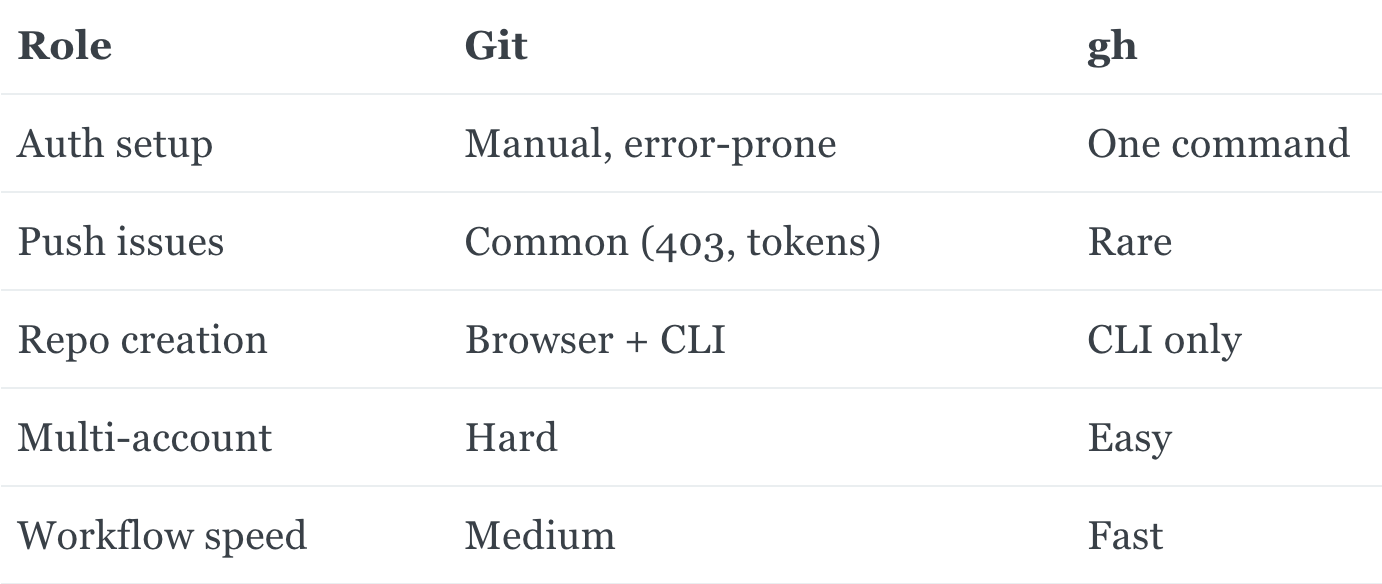
I like how much simpler and easier working with GitHub becomes with the gh CLI. It helps remove time-wasting errors.
With Git:
git init
git add .
git commit -m "init"
git remote add origin repo-url
git push -u origin main
With gh:
# create repo and push in one step
gh repo create repo-name --source=. --remote=origin --push

gh auth status
You always know which account is active and where your actions are going.
When You Still Use git push
We don’t abbandon Git. Use Git for version control and gh for interacting with GitHub.
Ending
It happened after everything was already working. The bots were running. Docker was set up. The app structure was clean.
I double-checked the repository URL, the access token, and the Git configuration. And then it failed.
Permission denied.
The issue wasn’t in the code or the command. It was somewhere at a deeper level, wrong authentication with a different identity. Maybe from a previous session, a cached credential, an invisible layer deciding my identity.
That led me to GitHub CLI (gh). I chose the correct identity, verified it, and made it visible.
Originally published at https://datatodeploy.com on 27 Mar 2026.